Your AI sales workspace
Power & parallel dialing. With AI on every call.
Reach prospects, get live guidance while you talk, and turn every conversation into organized notes, contacts and next steps — all in RichRep.
- Setup requiredPower dialing, one line at a time
- PlannedParallel dialing — real lines are being built
- No card needed.
Phone · Power dialing
Demonstration · made-up people
Today's list
6 people- Maya OkaforBrightline RoofingOn the call
- Luis FerreiraHarbor Dental GroupUp next
- Grace LindqvistLakeside StorageQueued
- Tom WhitakerWhitaker FarmsNo answer · note saved
Lines at once
Real calls: one line. Two or more lines: practice mode for now.
Maya Okafor
Brightline Roofing · Owner
You 0:58
Is now still a good time to talk about the roof financing?
Maya 1:04
I have a few minutes. The main thing is the monthly payment.
You 1:20
What monthly number would make this an easy yes?
Maya 1:31
Under four hundred. And my partner has to sign off too.
Suggestion · from your saved answers
A partner has to sign: offer a short call with both of them. “Would Thursday morning work for the two of you?”
After the call
Maya is ready to move if the payment stays under $400 a month.
- Her partner signs too — joint call booked.
- Send the 12-year option before then.
- Prefers mornings.
Status: Warm → Hot
Why: she booked a call with her partner.
Next action · on your calendar
Thu 10:00 · Call with Maya and her partner
Every sales conversation, not just phone calls
Press Start session, pick what kind of conversation it is, and talk. RichRep records it, writes it down and files it with the right person — at your desk or in the field.
- Setup required
Online meetings
Join a Zoom or Google Meet call in Chrome on your computer. RichRep records the meeting tab and your microphone, then writes it up like a call.
A recorder that joins meetings by itself is planned.
- Setup required
In-person meetings
Sitting across the table? Start a session on your phone and put it down. The conversation is saved, written up and filed with the person.
- Setup required
Field prospecting
Going door to door? One session covers the whole walk, and each visit keeps its own conversation, contact and next step.
- Planned
Inbound calls
The AI Receptionist answers your line when you can't, takes the caller's details and the reason they called, and hands you the follow-up.
From the first dial to the follow-up
Four steps, shown on real RichRep screens with sample data.
Step 1 of 4
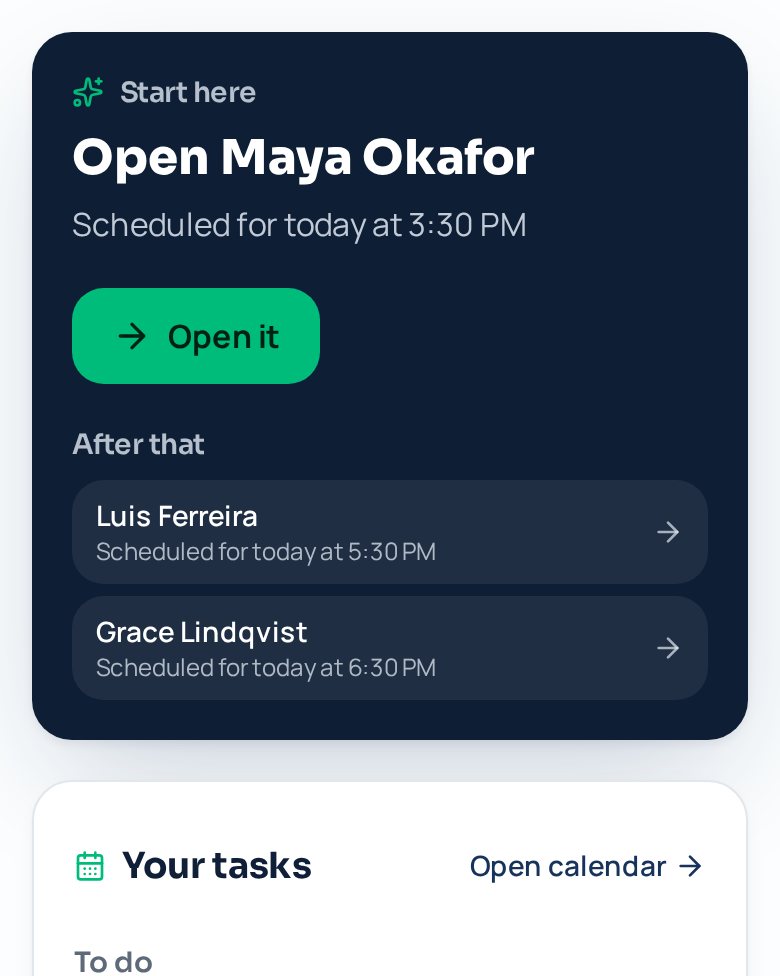
Know who to call
Today puts one person at the top with the reason — a callback you promised, a follow-up that is due — and your call list feeds the dialer.
Step 2 of 4
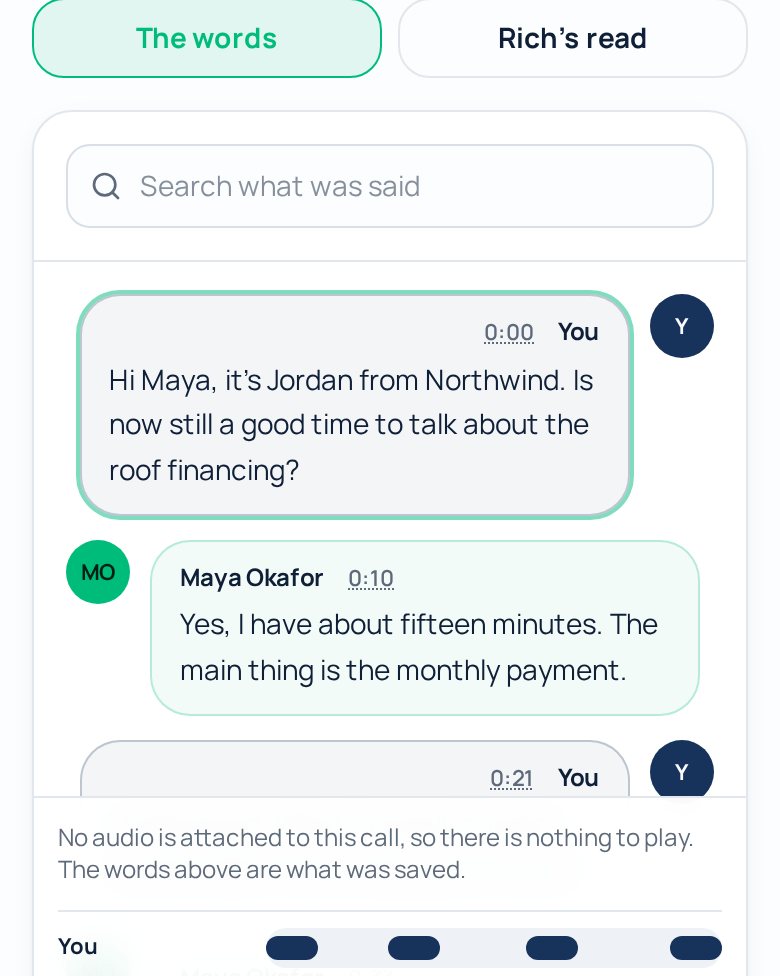
Talk, with AI beside you
The words appear as you talk, marked with who said them. Your saved answers to objections and Rich's suggestions sit next to the call.
Step 3 of 4
Get the short version
When the call ends: one sentence, up to three points, and any change to where the lead stands, with the reason. The full read is one click away.
Roof financing follow-upSample call, made-up peopleRich's read of this call
Maya wants the roof financed under $400 a month; the 12-year plan at $385 fits.
Ready to move if the payment stays under $400 a month.
Her partner signs too — they join Thursday at 10:00.
Send the 12-year proposal today, before that call.
Status: Warm → Hot
Why: She booked a joint call for Thursday at 10:00 with her partner.
Show full analysis (6)
Recap
Maya wants the roof financed under $400 a month; the 12-year plan at $385 fits. Her partner must agree, so a joint call is booked for Thursday at 10:00 and the proposal goes out today.
Next steps
Send the 12-year financing proposal today.
Joint call with Maya and her partner, Thursday 10:00.
What matters to them
Monthly payment must stay under $400.
Questions or worries
Partner has to agree before signing.
Promises made
Jordan sends the proposal today.
Signs they may buy
Asked for the proposal and picked a time.
Step 4 of 4
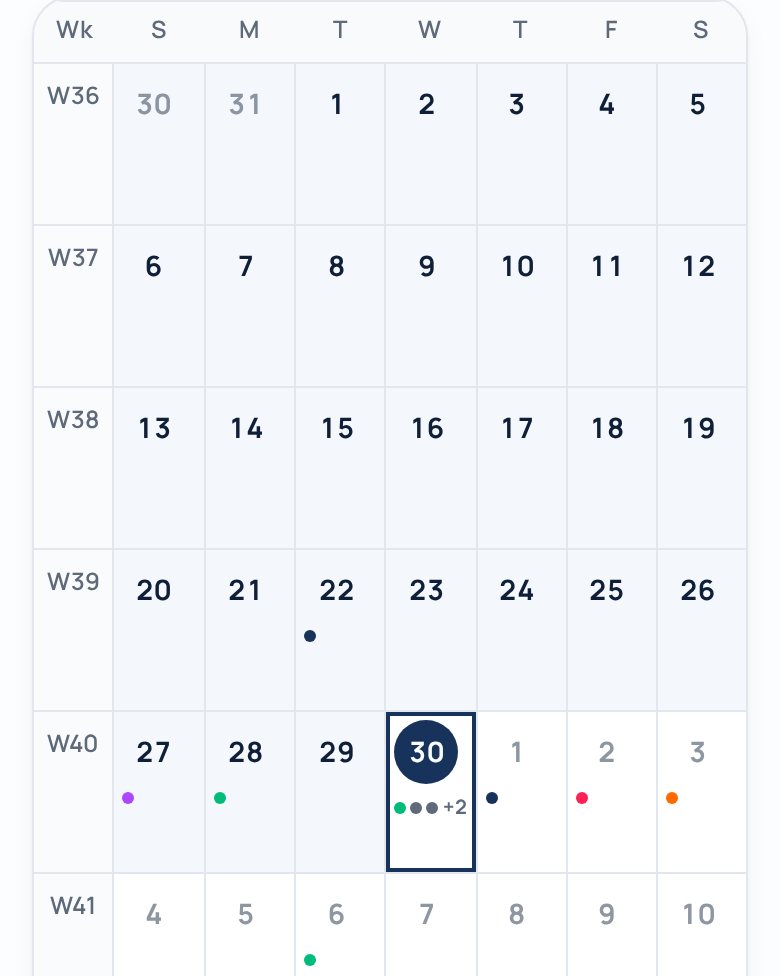
Next steps, organized
What was agreed lands on your calendar with a time, next to the rest of your day. Move it and the same event moves; delete it and you can undo.


Your whole day, organized
Sales days don’t stop at five. Put the run, the school pickup and the client call on one calendar — each with its own area, colour and icon — and see where your time really goes. Your own events stay private to you.
- Health, Family, Friends, Love and Work to start — rename, recolour or add your own
- Label work by business or project, with your own logo
- Attach PDFs, save templates, and undo a delete
Thursday
- HealthGo on a run7:00
- Work · Business 1Sales meeting11:00
- FamilyKids' soccer game5:00
- LoveDinner with Sam7:30
RichRep suggests an icon from the title. You can always pick your own.
What RichRep connects to
Each name says how far along it is. A connection moves up only after it works for real customers.
Works today, once connected
Calls and texts run on a Twilio phone line. Online meetings are recorded from your browser tab.
- Twilio phone line
- Zoom in Chrome
- Google Meet in Chrome
Built, waiting on provider approval
The code is written. Each one needs its provider's approval before customers can connect.
- Gmail
- Outlook
- Google Calendar
- Salesloft
Chrome add-on, in private testing
Live guidance on top of the dialer you already use.
- Salesloft
- Outreach
- HubSpot
- Apollo
Planned
Needs each platform's approval or a new build.
- Zoom meeting recorder
- Google Meet recorder
- iPhone app
- Android app
Where everything stands today
What you can use now, what runs in practice mode, and what is still being built.
Power dialing
Pick a list and RichRep calls the next person as soon as you finish the last call, one line at a time. Needs a connected phone line; until then it runs in practice mode.
Setup requiredParallel dialing
Real calls on several lines at once are being built. Until then you can try it in practice mode, where nobody is called.
PlannedLive guidance on calls
The words appear as you talk, with your saved answers to objections and Rich's suggestions beside them. Needs speech-to-text turned on for your workspace.
Setup requiredNotes, contacts and next steps
After a call: a short summary, the contact updated, and the agreed follow-up on your calendar.
Setup requiredOnline meetings
Record a Zoom or Google Meet call you join in Chrome on a computer, by sharing the meeting tab's sound.
Setup requiredIn-person meetings and field prospecting
Record conversations on your phone's microphone, with each visit kept separate.
Setup requiredAI Receptionist
Answers your business line when you can't. Being built; not answering calls yet.
PlannedMeeting recorder that joins for you
A recorder that joins Zoom and Google Meet calls by itself needs each platform's approval first.
PlannediPhone and Android apps
RichRep runs in your phone's browser today.
Planned
Questions people ask first
Is parallel dialing ready?
Not on real calls yet. You can ring up to five numbers at once in practice mode, where nobody is really called. On a real phone line RichRep calls one person at a time — power dialing — until multi-line calling is finished and tested.
Do I need a credit card?
No. There is no checkout in RichRep yet. Pricing is still being decided, and nothing is charged.
Can I keep my own phone number?
Yes, in two ways today: show it to the people you call from RichRep, and forward it so calls to it ring in RichRep. Moving the number to RichRep (porting) is being built.
Are my calls and meetings recorded?
Only when recording is on, and the screen says so while it happens. Recording laws differ by state and country — some need everyone in the conversation to agree — so tell people before you record.
Does it work with the tools I already use?
Gmail, Outlook, Google Calendar and Salesloft connections are built and are being switched on. A Chrome add-on for Salesloft, Outreach, HubSpot and Apollo is in private testing. Until then, RichRep works on its own in your browser.
Work your first call list today.
Create your account, add a few contacts and run a practice call list. It takes about five minutes.